
OCPP 2.0.1 test CSMS for charge point and wallbox developersSee what your charge point is really saying
EVSExplorer is an OCPP 2.0.1 test CSMS for charge point and wallbox development. Point a real station at it, inspect every message against the official schemas, analyze connection stability, fire any request and automate all of it through a REST API. Run it in our cloud or on your own hardware.
- Cloud or self-hosted: your choice, same product
- OCPP 2.0.1 WebSocket server for real charge points
- Every message validated against the official JSON schemas
- Full REST API for CI and scripted tests
- AI agent ready (skill file included)
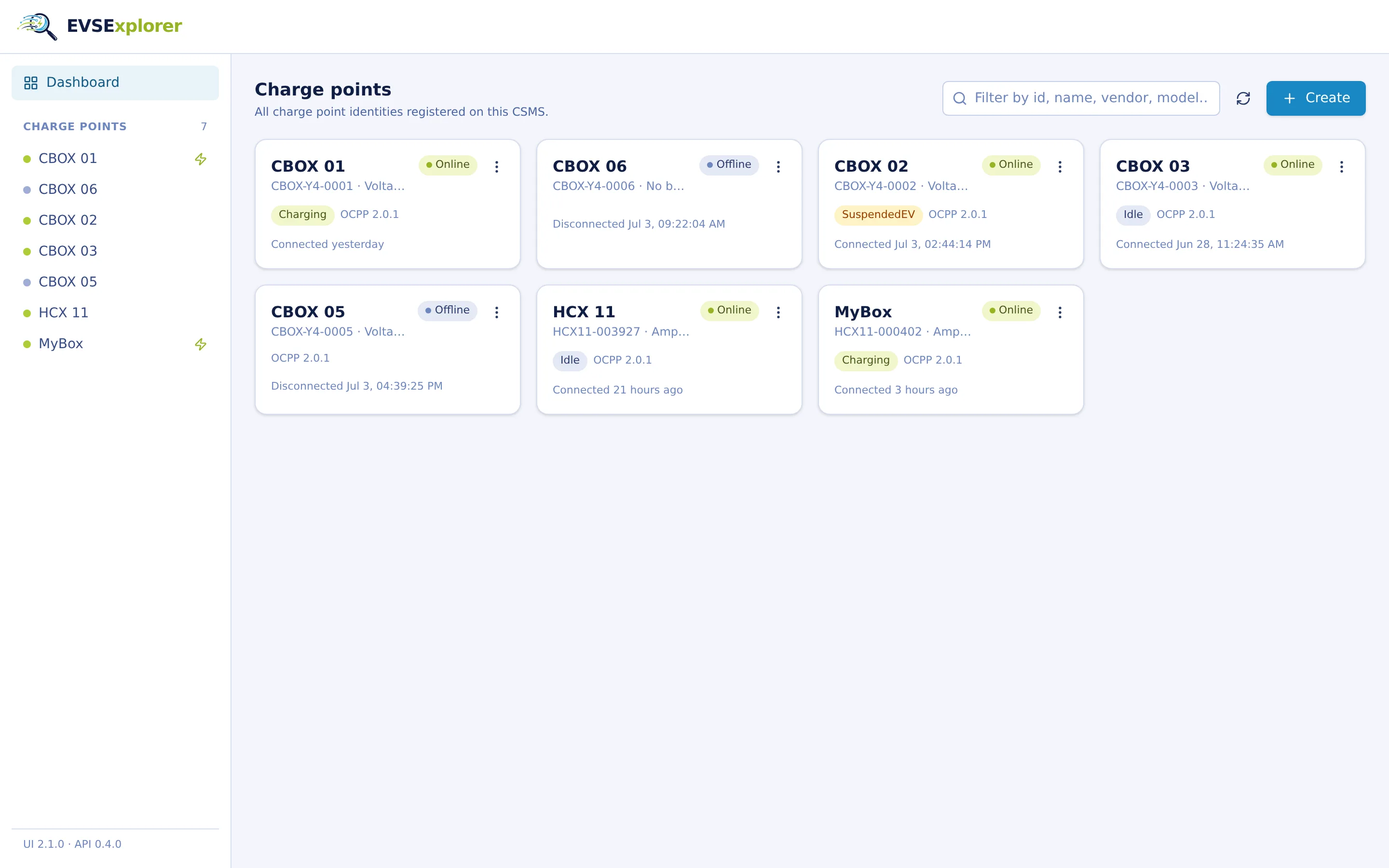
Built for the whole charging station team
From the first BootNotification of a new prototype to the release test report. One tool for the bench.
Developers
Follow every frame while you code. Watch your station's OCPP-J traffic live, inspect schema-validated payloads and answer “what did we actually send?” in seconds. No more digging through serial logs.
Testers
Make the flaky stuff reproducible. Close WebSocket connections, block reconnects, auto-respond with custom or deliberately broken payloads, then watch exactly how the station recovers.
Project managers
Know where every prototype stands. A live dashboard across all devices on the bench, uptime figures and transaction histories you can drop straight into a status report.
A closer look
Real screenshots, real bench traffic. This is what your day-to-day with EVSExplorer looks like.
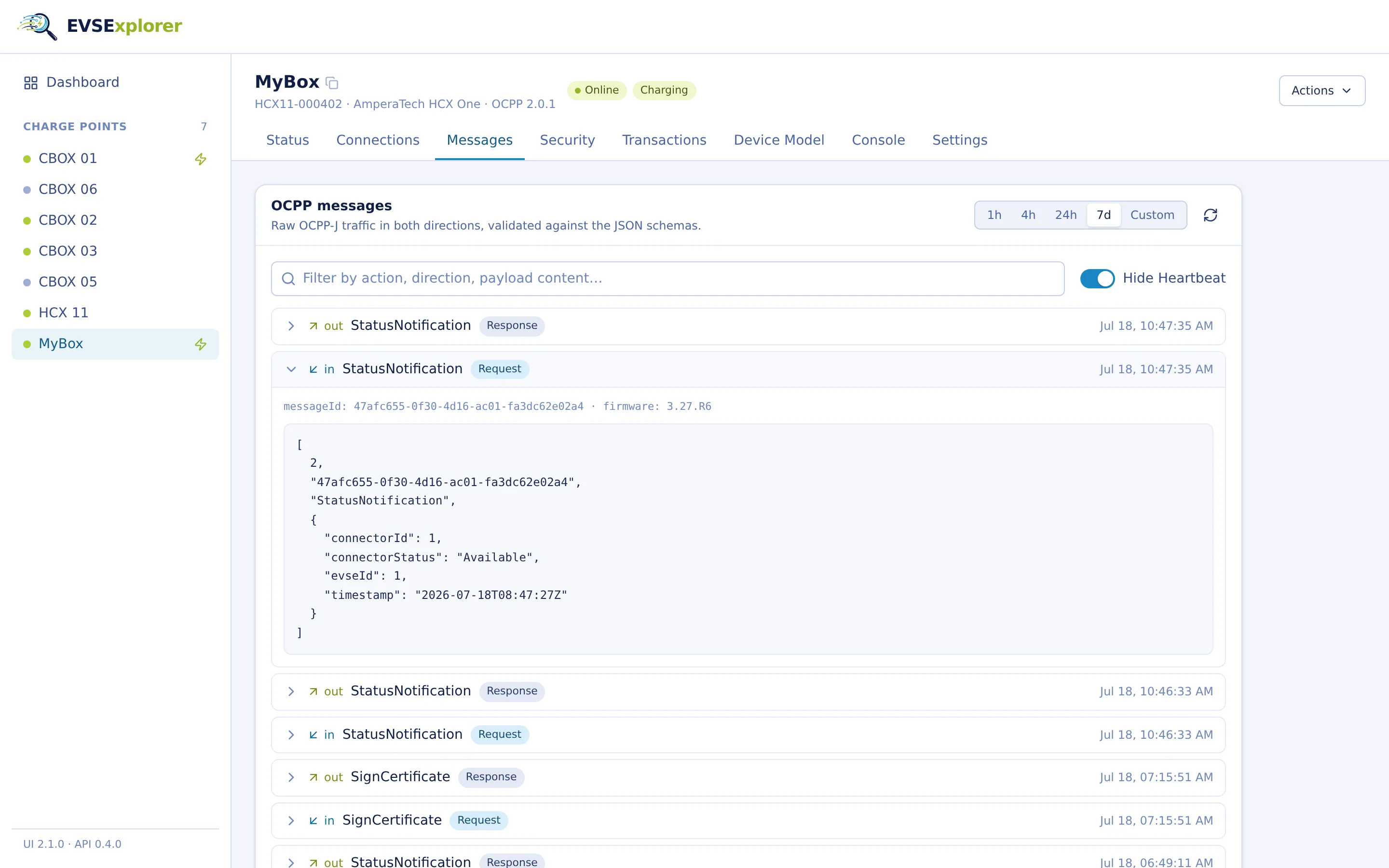
Message log
Every OCPP message, validated and searchable
Raw OCPP-J traffic in both directions, checked against the official OCPP 2.0.1 JSON schemas. Filter by action, direction or payload content, hide heartbeat noise, and expand any frame to see exactly what went over the wire.
- Request / response / error pairing with anomaly detection (late, duplicate and unmatched responses are flagged)
- Full-text search inside payloads
- Rolling time windows or custom historical ranges
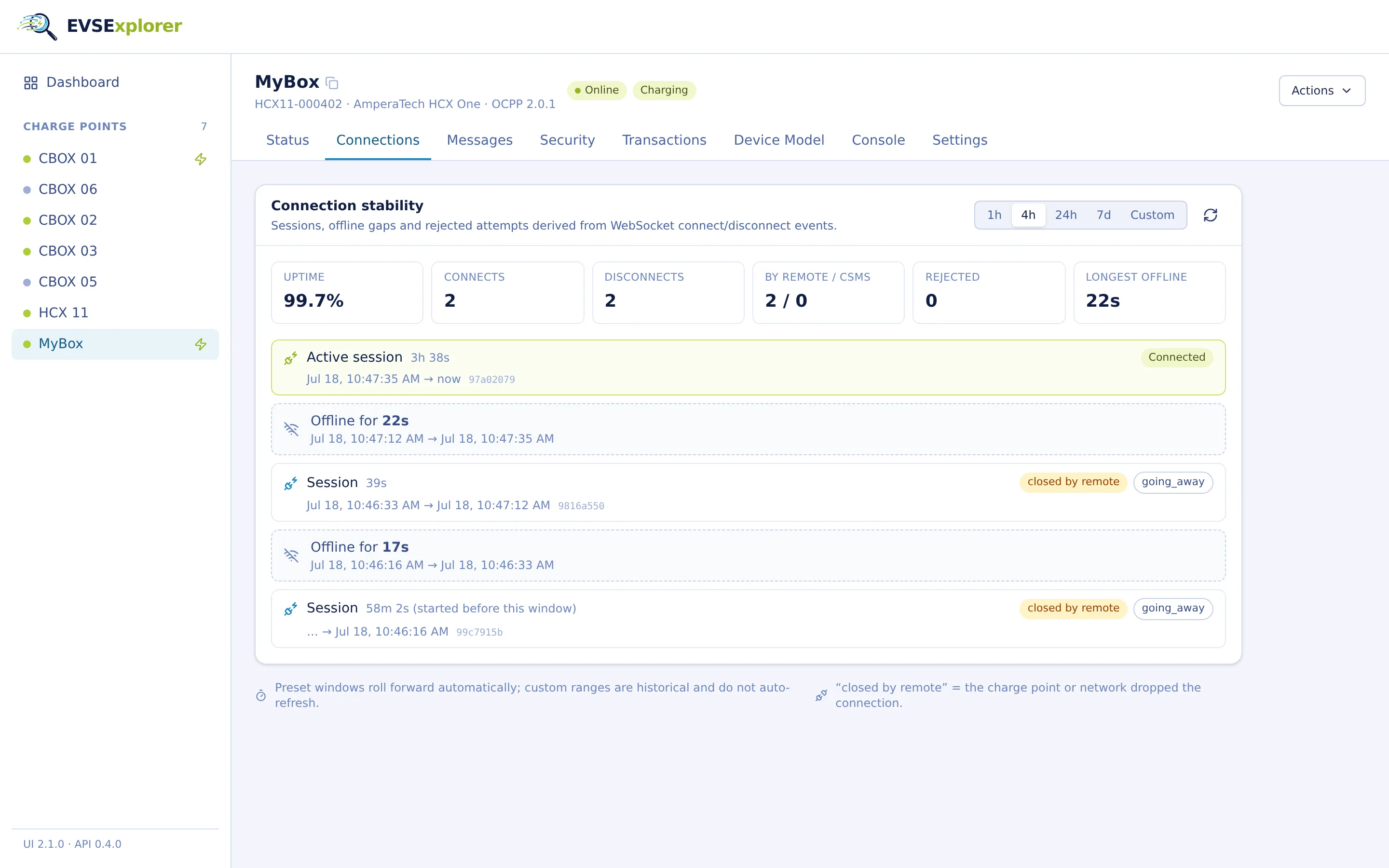
Connection stability
Find flaky connections before your customers do
Sessions, offline gaps and rejected attempts are derived from raw WebSocket connect and disconnect events, including who closed the connection and why.
- Uptime, connect/disconnect counts and longest offline gap per time window
- Close codes and originator: did the station close the socket, or did the CSMS?
- Session timeline down to the second
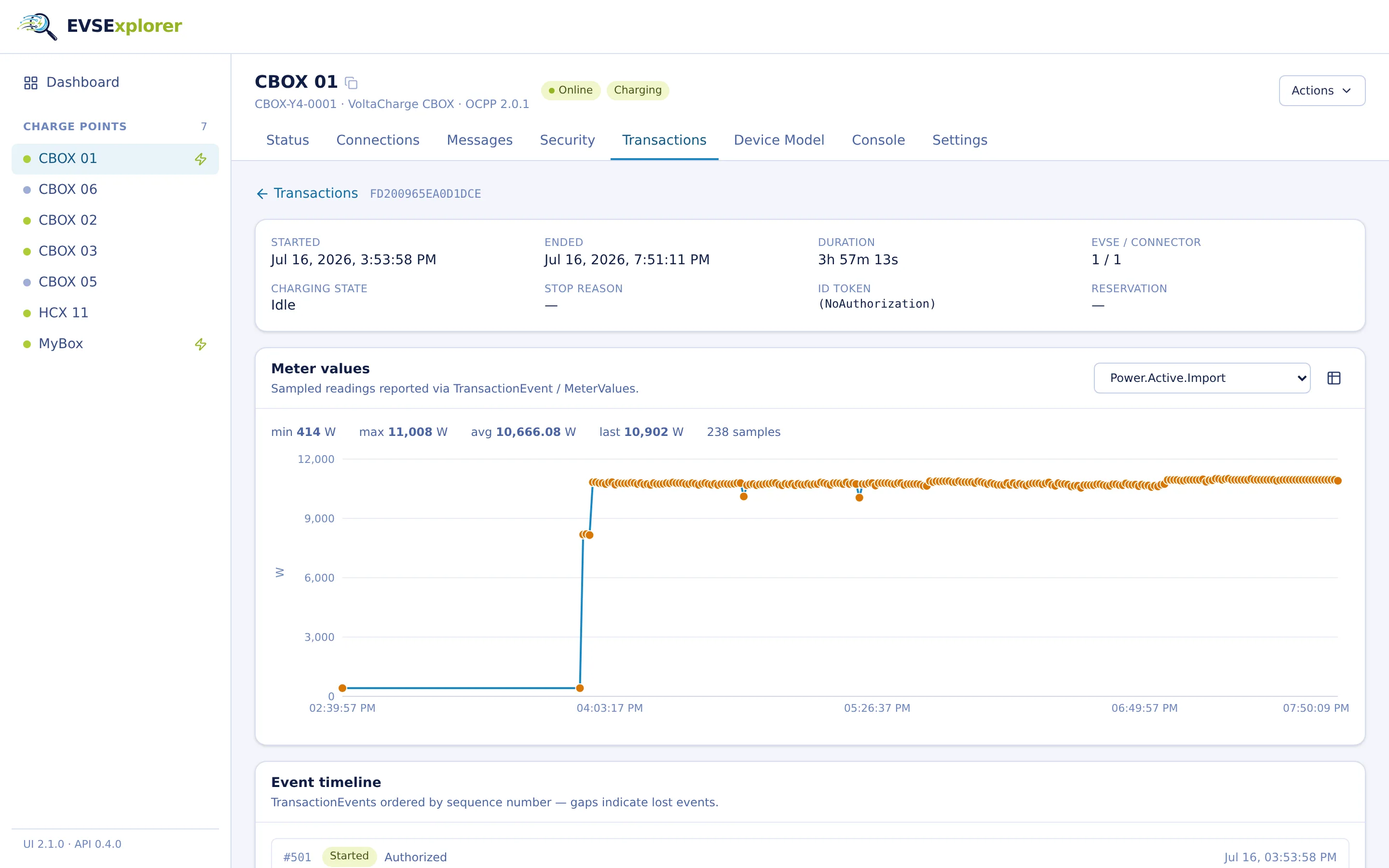
Transactions
From the first TransactionEvent to the last meter value
Charging sessions with a full event timeline and charts for every reported measurand (power, energy, state of charge, voltage, current, per phase where available).
- Sequence numbers made visible (gaps reveal lost events)
- Offline-recorded meter values are flagged
- Stop reasons, ID tokens and remote/local context per transaction
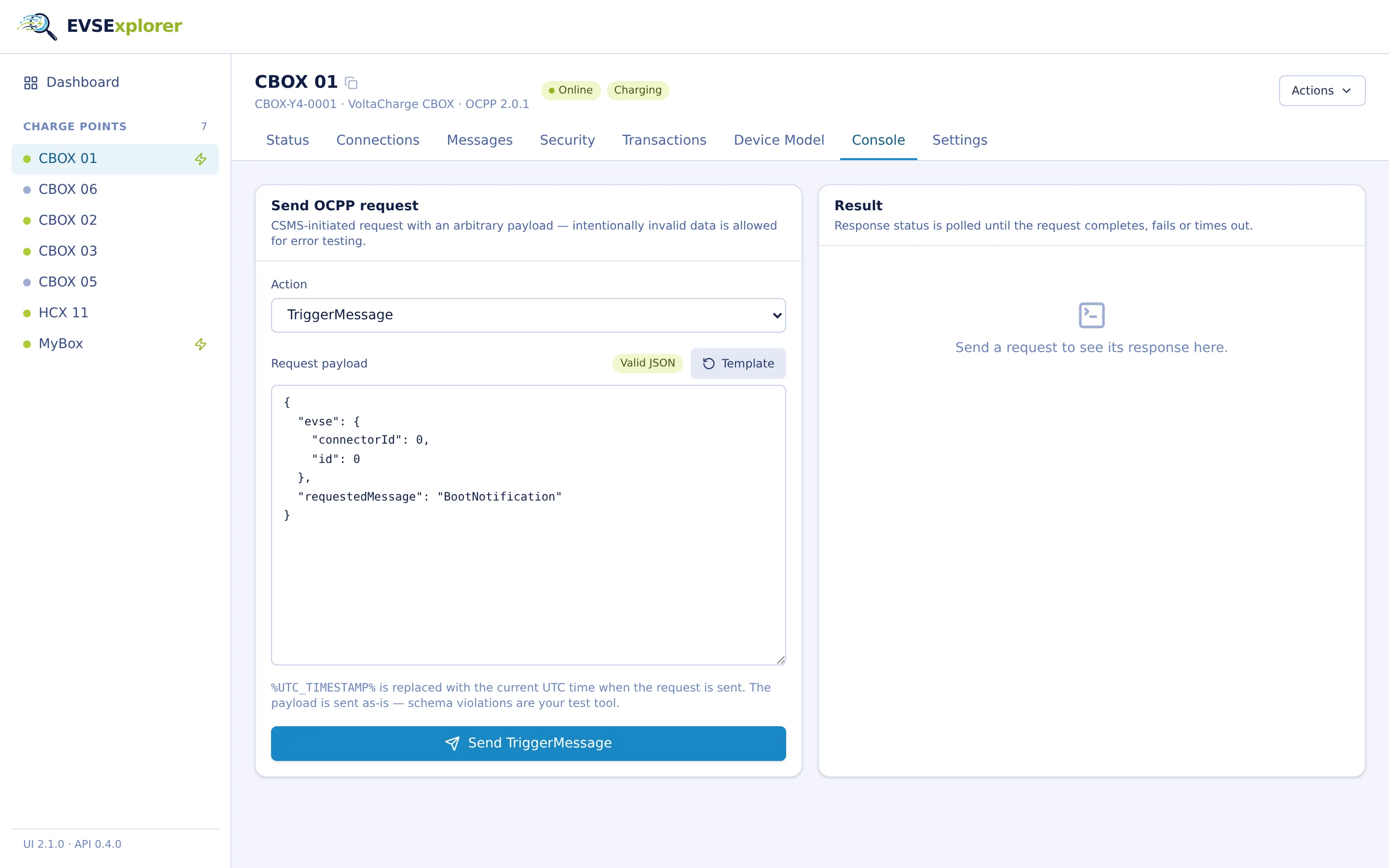
Command console
Send any request, even the broken ones
Fire every CSMS-initiated OCPP 2.0.1 action with an editable payload template. Schema violations are allowed on purpose: negative testing is a feature, not an error.
- Payload templates for all OCPP 2.0.1 actions
- %UTC_TIMESTAMP% placeholder resolved at send time
- Responses tracked until they complete, fail or time out
Everything you need for OCPP 2.0.1 work
No mock data, no magic. Every feature works on the real traffic of your charging stations.
OCPP 2.0.1 CSMS
A WebSocket server speaking OCPP-J 2.0.1, handling many charge points concurrently, with optional HTTP Basic Auth per station.
Schema validation
Every incoming and outgoing message is validated against the official OCPP 2.0.1 JSON schemas, so compliance issues surface immediately.
Live dashboard
All registered charge points with connection state, charging state, firmware and vendor info, refreshed automatically.
Auto-responses
Answer station-initiated requests automatically: custom payloads per action, standard CallErrors, or full manual control.
Connection analytics
Uptime, sessions, offline gaps, close codes and rejected connection attempts, derived from every single WebSocket event.
WebSocket control
Close a station's connection or block reconnects for a defined period to test offline behavior and recovery.
Transactions & meter values
Event timelines with lost-event detection and per-measurand charts for detailed meter value analysis.
Security events
Security notifications and certificate-related traffic of each charge point in one place.
Device model browser
Request a base report and browse the reconstructed EVSE / component / variable tree of the station.
Command console
Every CSMS-initiated action with editable payloads, including intentionally invalid ones for negative tests.
Message history
Browse, filter and search all OCPP traffic in rolling or custom time windows.
REST API
Everything the UI does is available as a documented REST API, the foundation for scripted and CI-driven testing.
Automate it all through the REST API
The UI is just one client. Register stations, send commands, read logs and assert on results from your test scripts or CI pipeline. The OpenAPI specification documents every endpoint.
- Send any OCPP action and poll its result (202, then completed, failed or timed out)
- Query message logs, connection events, transactions and meter values with time filters
- Configure auto-responses and connection blocking on the fly
Also runs on your own hardware (a Raspberry Pi is enough). Your OCPP traffic never leaves the lab.
# Register a charge point identity
curl -X POST http://bench-pi:8081/api/charge-points \
     -H 'Content-Type: application/json' \
     -d '{"id": "PROTO-0042", "name": "Prototype 42"}'

# Fire an OCPP request at the station
curl -X POST http://bench-pi:8081/api/charge-points/PROTO-0042/commands/TriggerMessage \
     -d '{"requestedMessage": "BootNotification"}'
# 202 Accepted  {"message_id": "4f2a97c1-..."}

# Poll the result and assert on the reply
curl http://bench-pi:8081/api/charge-points/PROTO-0042/commands/4f2a97c1-...
# {"status": "completed", "response": {"status": "Accepted"}}
AI-ready
Let your AI agent drive the test bench
The REST API is designed for efficient use by LLM-based agents, and EVSExplorer ships with a skill file that teaches your AI assistant the domain model, the interaction patterns and the common workflows, so it can operate the bench for you.
- Self-teaching: the instance serves its skill file at /api/skill.md. Point Claude Code or any agentic tool at it and the agent learns the domain model and workflows on the spot
- Token-efficient by design: server-side limits, time-range filters, action exclusion and sparse field selection keep responses small enough for models with a limited context window
- Machine-readable error codes and an asynchronous command pattern that agents can poll deterministically
- The OpenAPI spec is served by the instance too, so agents can discover every endpoint at runtime
I have an EVSExplorer instance at bench-pi:8081. Fetch the skill.md from http://bench-pi:8081/api/skill.md and tell me which devices are online.
I'll fetch that skill file from the local API.
Ran 1 shell command
Now I understand the API. Let me query the charge points endpoint filtered for connection status.
Ran 1 shell command
Of the 7 registered charge points, only one is currently online: – MyBox — connected, state: Idle The other 6 are offline (disconnected), among them: – CBOX 01 (Idle) – CBOX 02 (Charging — likely stale, since it's disconnected)
✳ Cooked for 15s
When was CBOX 01 last connected?
Ran 1 shell command
CBOX 01 was last connected on 2026-07-16 at 12:14 UTC, then disconnected at 06:32 UTC the next day (reason: no_status_rcvd, disconnect initiated remotely) — so it's been offline for about a day.
✳ Brewed for 7s
What's the configured MessageTimeout on that charge point?
Ran 1 shell command
messageTimeoutSeconds is 30 (the default) — that's the window the CSMS waits for a response to a CSMS-initiated request before it's classified late.
✳ Brewed for 6s
How long is MyBox connected?
Ran 2 shell commands
MyBox reconnected at 2026-07-18 13:57:51 UTC and has been connected for about 12 minutes (as of now, 14:09:56 UTC).
✳ Cooked for 12s
Reboot that charge point
Ran 1 shell command
Reset command sent. Checking the outcome.
Ran 1 shell command
The charge point accepted the Reset (Immediate) command — status Accepted, command completed. It should be rebooting now.
✳ Crunched for 31s
Check if it reconnected
Ran 1 shell command
Not yet — it disconnected (going_away, remote-initiated) at 14:11:02 UTC in response to the reset, but hasn't reconnected. It's currently rebooting. Want me to keep polling?
From a real agent session (Claude CLI) against a bench instance.
Put EVSExplorer on your bench
Tell us about your setup and testing requirements. We'll show you EVSExplorer live and get you started within days.
Contact us
Get in touch to discuss your OCPP testing requirements and discover how EVSExplorer fits your workflow.
Contact usExpert support
Technical guidance from OCPP specialists
Quick setup
Start testing your charge points within hours
Custom solutions
Tailored implementations for your specific needs